• Do not use Discord to host any images you post, these links expire quickly! You can learn how to add images to your posts here.
  • Reminder: AI-generated content is not allowed on the forums per the Rules and Regulations. Please contact us if you have any questions!
Resource icon

Resource Emerald Essentials 1.1.0

Xysmaniac

Rookie
Member
Joined
Mar 8, 2025
Posts
8
Xysmaniac submitted a new resource:

Emerald Essentials - Conversion project of prets 'pokeemerald' to RMXP for Essentials

giphy.gif


This has been about four months of work, almost five, straight through... I wanted to start an Essentials project but also wanted to use Emerald assets and I wasn't content with all the lacking, well, assets. So, I decided to rip everything from pret's...

Read more about this resource...
 
Xysmaniac updated Emerald Essentials with a new update entry:

Added some overlooked graphics and a few Autotile updates

-Rearranged 3 autotiles (Water Currents, Water Rock, Waterfall) for simpler individual tile selection

-Added 10 Characters (Event Objects)
Object Ash Puff
Object Cut Grass
Object Mountain Disguise
Object Pokecenter Pokeball Glow
Object Pokecenter Monitor
Object Record Mix Lights
Object Sand Pile
Object Small Sparkle
Object Sparkle
Object Tree Disguise

-Added 6 Pictures
Bird
Spotlight
Shadow Extra Large
Shadow Large
Shadow Medium...

Read the rest of this update entry...
 
Okay I could be a moron, but I'm not seeing a download button for this resource?
 
Okay I could be a moron, but I'm not seeing a download button for this resource?
the download is inside the post, scroll down until you see a huge green "Download" text, click on it and you will go to Mediafire
 
I updated the 'Download' link/text to hopefully be a little more obvious for anyone else in the future. 🙂 I also added brief Installation instructions below that in the chance that might have been a question going forward as well. Hope this helps!
 
Xysmaniac updated Emerald Essentials with a new update entry:

Added (I believe) every Playable/Non-Playable Character overworld sprite with Trainer battle sprites

v1.1.0

-Added 102 Trainer battle sprites
AQUAADMIN_F
AQUAADMIN_M
AQUAGRUNT_F
AQUAGRUNT_M
AQUALEADER_Archie
AQUAUNUSED
ARENATYCOON_Greta
AROMALADY
AUQUAUNUSED
BATTLEGIRL
BEAUTY
BIRDKEEPER
BLACKBELT
BRENDAN_RS
BUGCATCHER
BUGMANIAC
CAMPER
CHAMPION_Wallace
COLLECTOR
COOLTRAINER_F
COOLTRAINER_M
CYCLINGTRIATHLETE_F
CYCLINGTRIATHLETE_M
DOMEACE_Tucker
DRAGONTAMER
ELITEFOUR_Drake
ELITEFOUR_Glacia
ELITEFOUR_Phoebe
ELITEFOUR_Sidney
EXPERT_F
EXPERT_M
FACTORYHEAD_Noland
FISHERMAN...

Read the rest of this update entry...
 
Last edited:
This is great, thank you! It'd be very lovely if you get around to show the scripts (like how you did the clouds moving around like that) at some point, but this is already very helpful.
 
Honestly, this resource was super helpful. I'm using it for a Hoenn fangame.

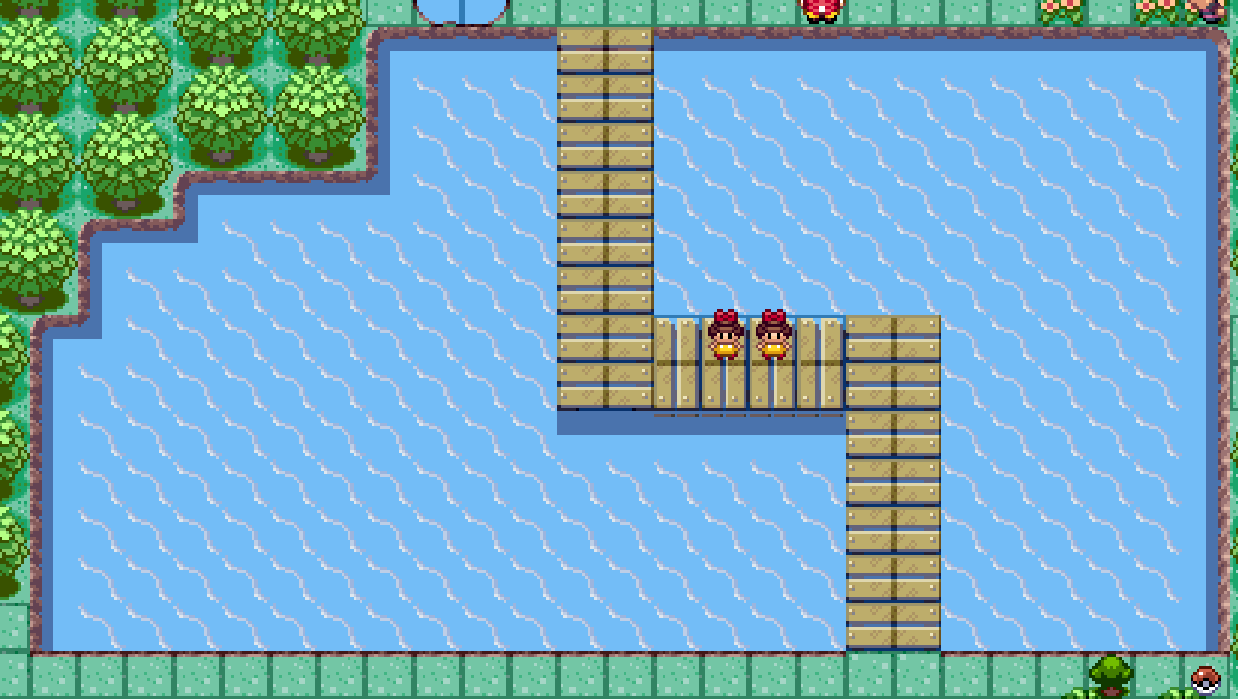
However, I was trying to find this water autotile from Route 104 but I couldn't find it. I believe it might've been Water Windy but it wasn't working for me. Any help with this one?

EzdAKrI.png
 
Honestly, this resource was super helpful. I'm using it for a Hoenn fangame.

However, I was trying to find this water autotile from Route 104 but I couldn't find it. I believe it might've been Water Windy but it wasn't working for me. Any help with this one?

EzdAKrI.png
"The Panoramas are animated GIFs. If you decide to use them, you will have to (unless there is a way to change it on a per map basis which I have yet found out yet), edit [[ Sprites ]] > Spriteset_Map > line 112 and 113 or otherwise to (I suggest commenting out)
# @panorama.ox = tmox / 2
# @panorama.oy = tmoy / 2
@panorama.ox = tmox

@panorama.oy = tmoy
That will allow the GIFs to play undisturbed under the map. I have created special pond variations in the Outside tileset and a Windy Water autotile specifically for the purpose of these panoramas."

"Windy Water.gif" goes into the Panoramas folder, you then will have to edit the specified lines in Scripts for it to animate. Said script change does affect Panoramas globally which I am not sure of a way to work around that. Also make sure that there are no tiles placed where you want the animated water as the gif plays under the map, so keep up to the land borders and have empty tiles where you want the water. I hope that makes sense.
 
This is great, thank you! It'd be very lovely if you get around to show the scripts (like how you did the clouds moving around like that) at some point, but this is already very helpful.
You just have to add a Change Map Settings event, for example :Change Map Settings:Fog = 'Clouds' 0, 64, Sub, 100, -2, 0. I don't have my original test map anymore so I can't recall the exact settings I used. Fiddle around with the SX setting (Negative to go left/correct direction) to get the exact speed you want/to match the Clouds Panorama if you are also using that.
 
Back
Top