

- Pokémon Essentials Version
- v21.1 ✅
I was inspired by rainefall's Pokémon PBS Syntax Highlighting (for Notepad++) and created my own Notepad++ language for syntax highlighting, updated with v20.1 PBS attributes (and picked colors that I felt worked well with dark mode and were common in official Notepad++ syntax highlighting).
Installation Instructions:
1. Open a PBS file in Notepad++
2. Open the Language menu in the top menu bar
3. Go to User Defined Language -> Define Your Language...
4. Click the Import... button in the top left, and select the PBS_Language.xml file you downloaded
5. Close the User Defined Language window, open the Language menu again, and select PBS (Pokémon)
(If it's not there, try closing and re-opening Notepad++)
Unfortunately, you do have to re-select the Language each time you open a PBS file, but you only have to import it the one time.
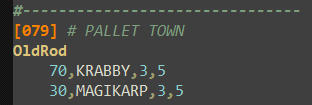
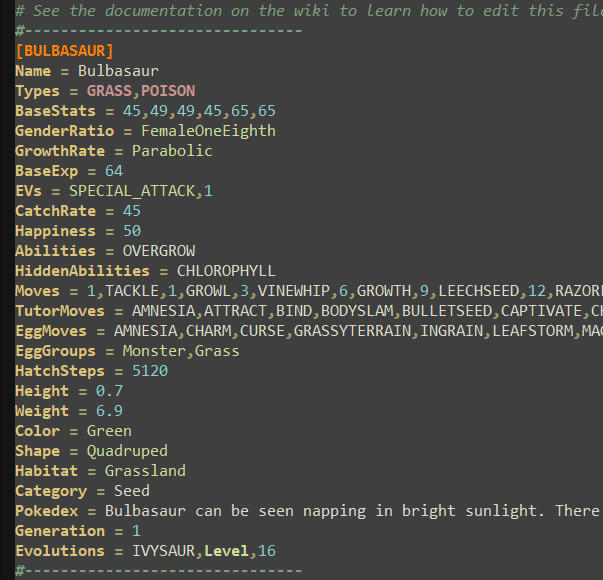
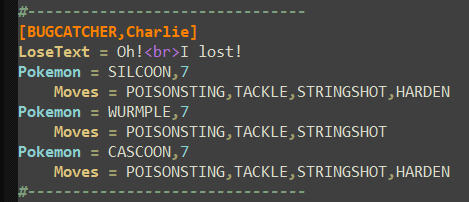
Installation Instructions:
1. Open a PBS file in Notepad++
2. Open the Language menu in the top menu bar
3. Go to User Defined Language -> Define Your Language...
4. Click the Import... button in the top left, and select the PBS_Language.xml file you downloaded
5. Close the User Defined Language window, open the Language menu again, and select PBS (Pokémon)
(If it's not there, try closing and re-opening Notepad++)
Unfortunately, you do have to re-select the Language each time you open a PBS file, but you only have to import it the one time.
If you don't like the colors I picked, or need to add/remove certain keywords from highlighting, it's easy to update on the fly! You could easily import this language several times, rename them, and alter them to be specifically tailored for different PBS files, so you had a "PBS Pokemon", "PBS Trainers", etc.
Navigate back to the User Defined Language window, and select PBS (Pokémon) from the drop down in the top left. There are 4 tabs where you can change the styling of the language syntax. You can update the color/styling of something by clicking the Styler button.
Navigate back to the User Defined Language window, and select PBS (Pokémon) from the drop down in the top left. There are 4 tabs where you can change the styling of the language syntax. You can update the color/styling of something by clicking the Styler button.
- I didn't do anything with the first page, Folder & Default.
- Keyword Lists styles individual keywords. You can add new keywords just by typing them in (case sensitive), separated by spaces.
- 1st group is PBS attributes (i.e. left of the = sign).
- 2nd group is attributes from plugins (you could remove these or move them to 1st group).
- 3rd group is pokemon types (I also put "End" here for the phone PBS).
- 4th group is booleans (true/false), the Pokemon trainer attribute, and the Intro phone attributes.
- 5th group is most attribute values (i.e. right of the = sign).
- 6th group is evolution methods, phone body attributes, Special/Physical for moves, and TR/TM/HM.
- 7th & 8th group are unused, but do have styles defined.
- Comment & Numbers has 3 sections. "Comment line style" defines the styling for everything after a "#". "Number style" defines the styling for numbers. I used "Comment style" to bold the separator comments (i.e. "#-------------------------------").
- Operators & Delimiters styles individual symbols (e.g. commas or = signs) and things wrapped in symbols.
- "Delimiter 1 style" is strings (i.e. things wrapped in " marks).
- "Delimiter 2 style" is PBS IDs (i.e. things wrapped in [ ] brackets).
- "Delimiter 3 style" is html tags (i.e. things wrapped in < > brackets), primarily for highlighting "<br>" in messages.
- Credits
- No credit needed or expected