

- Pokémon Essentials Version
- v21.1 ✅
- Also compatible with
- v20.1
Hello, it's me again!
⚠ please read the installation guide and the FAQ before asking questions, I will not answer what has already been answered there. ⚠
⚠ please read the installation guide and the FAQ before asking questions, I will not answer what has already been answered there. ⚠
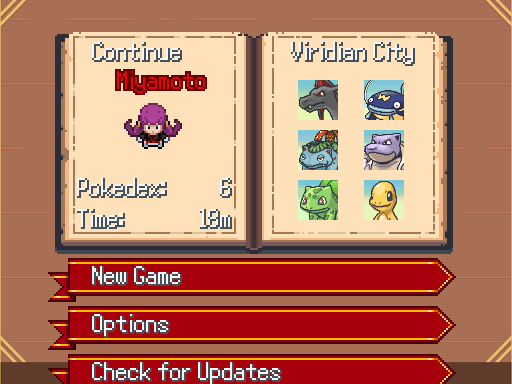
This time I bring a script to replace the Gen 3 style icons with those from Mystery Dungeon on the Save Loading screen.
an example of how it looks in my game:
(outdated, but still serves as an example).
The script supports shinies, gender difference and forms, so don't worry about it.
installation guide
Script Snippet:
Ruby:
class PokemonLoad_Scene
  def pbStartScene(commands, show_continue, trainer, stats, map_id)
    @commands = commands
    @sprites = {}
    @viewport = Viewport.new(0, 0, Graphics.width, Graphics.height)
    @viewport.z = 99998
    addBackgroundOrColoredPlane(@sprites, "background", "Load/bg", Color.new(248, 248, 248), @viewport)
    y = 32
    commands.length.times do |i|
      @sprites["panel#{i}"] = PokemonLoadPanel.new(
        i, commands[i], (show_continue) ? (i == 0) : false, trainer, stats, map_id, @viewport
      )
      @sprites["panel#{i}"].x = 48
      @sprites["panel#{i}"].y = y
      @sprites["panel#{i}"].pbRefresh
      y += (show_continue && i == 0) ? 224 : 48
    end
    @sprites["cmdwindow"] = Window_CommandPokemon.new([])
    @sprites["cmdwindow"].viewport = @viewport
    @sprites["cmdwindow"].visible  = false
  end

  def pbStartScene2
    pbFadeInAndShow(@sprites) { pbUpdate }
  end

  def pbStartDeleteScene
    @sprites = {}
    @viewport = Viewport.new(0, 0, Graphics.width, Graphics.height)
    @viewport.z = 99998
    addBackgroundOrColoredPlane(@sprites, "background", "Load/bg", Color.new(248, 248, 248), @viewport)
  end

  def pbUpdate
    oldi = @sprites["cmdwindow"].index rescue 0
    pbUpdateSpriteHash(@sprites)
    newi = @sprites["cmdwindow"].index rescue 0
    if oldi != newi
      @sprites["panel#{oldi}"].selected = false
      @sprites["panel#{oldi}"].pbRefresh
      @sprites["panel#{newi}"].selected = true
      @sprites["panel#{newi}"].pbRefresh
      @selected_panel = newi
      end
    end
  end

  # Helper method to resolve face filename with priority:
  # 1. Shiny Folder (if shiny) -> 2. Default Folder
  # Inside folder: Specific (Form/Gender) -> General (Species)
  def pbGetFaceFile(pkmn)
    return nil if !pkmn

    species = pkmn.species.to_s.upcase
    form = pkmn.form
    gender = pkmn.gender

    # Generate candidate filenames (without extension)
    candidates = []

    # 1. Species + Form + Gender (e.g., "VENUSAUR_1_female")
    if form > 0 && gender == 1
      candidates << "#{species}_#{form}_female"
      candidates << "#{species}_#{form}_f"
    end

    # 2. Species + Form (e.g., "VENUSAUR_1")
    if form > 0
      candidates << "#{species}_#{form}"
    end

    # 3. Species + Gender (e.g., "VENUSAUR_female")
    if gender == 1
      candidates << "#{species}_female"
      candidates << "#{species}_f"
    end

    # 4. Base Species (e.g., "VENUSAUR")
    candidates << species

    # Directories to search
    directories = []
    if pkmn.shiny?
      directories << "Graphics/Faces/shiny" # Prioritize shiny folder
    end
    directories << "Graphics/Faces"         # Fallback to default

    # Extensions to try
    extensions = [".png", ".bmp", ".gif"]

    # Check all combinations
    directories.each do |dir|
      candidates.each do |fname|
        extensions.each do |ext|
          path = "#{dir}/#{fname}#{ext}"
          return path if FileTest.exist?(path)
        end
      end
    end
  end

  def pbSetParty(trainer)
    return if !trainer || !trainer.party
    meta = GameData::PlayerMetadata.get(trainer.character_ID)
    if meta
      filename = pbGetPlayerCharset(meta.walk_charset, trainer, true)
      @sprites["player"] = TrainerWalkingCharSprite.new(filename, @viewport)
      if !@sprites["player"].bitmap
        raise _INTL("Player character {1}'s walking charset was not found (filename: \"{2}\").", trainer.character_ID, filename)
      end
      charwidth  = @sprites["player"].bitmap.width
      charheight = @sprites["player"].bitmap.height
      @sprites["player"].x = 154 - (charwidth / 8)
      @sprites["player"].y = 121 - (charheight / 8)
      @sprites["player"].z = 99999
      end
      trainer.party.each_with_index do |pkmn, i|
      @sprites["party#{i}"] = Sprite.new(@viewport)

      # Use helper method to find the correct file
      face_file = pbGetFaceFile(pkmn)

      if face_file
        @sprites["party#{i}"].bitmap = Bitmap.new(face_file)
      else
      # Raise error mainly to help debug missing files, can be changed to just print
        raise _INTL("Missing Portrait for #{pkmn.species} (Shiny: #{pkmn.shiny?}) in Graphics/Faces")
      end

      # Horizontal flip to look left
      @sprites["party#{i}"].mirror = true

      # Use center alignment
      if @sprites["party#{i}"].bitmap
        @sprites["party#{i}"].ox = @sprites["party#{i}"].bitmap.width / 2
        @sprites["party#{i}"].oy = @sprites["party#{i}"].bitmap.height / 2
      end

      # Position
      @sprites["party#{i}"].x = 318 + (66 * (i % 2))
      @sprites["party#{i}"].y = 100 + (50 * (i / 2))
      @sprites["party#{i}"].z = 99999
    end
  end

  def pbChoose(commands)
    @sprites["cmdwindow"].commands = commands
    loop do
      Graphics.update
      Input.update
      pbUpdate
      if Input.trigger?(Input::USE)
        return @sprites["cmdwindow"].index
      end
    end
  end

  def pbEndScene
    pbFadeOutAndHide(@sprites) { pbUpdate }
    pbDisposeSpriteHash(@sprites)
    @viewport.dispose
  end

  def pbCloseScene
    pbDisposeSpriteHash(@sprites)
    @viewport.dispose
  end
end
FAQ and known issues
- no issues found so far...
A: I believe it should only be compatible with v20+, but I haven't tested to be sure. Versions below this will not be supported by me personally, please do not ask.
Q: Does it work with PSDK?
A: no.
Q: What resolution is necessary for the icons to work?
A: To avoid headaches, the script was made to use the default resolution of the portraits at 40x40 dimensions with x1 pixel density. If you have them upscaled, the icons will look disproportionate and you will have to change the X and Y yourself to adjust them.
Q: Does it work with X plugin?
A: it should probably be compatible with any plugin that does not touch or rewrite the UI_Load scripts. In other words, if you are using Multi-Save plugins, the compatibility is almost nonexistent - you will have to make both work on your own, do not expect any kind of patch from me.
- Credits
- Script:
- WillowLee (originally for my game only)
PMD icons:
- PMD Sprites Collab team
Major helpers:
- Hedgie (name sorting)
- Wetchip (Compatibility with a future plugin)


